

Using ApprovalsJS and StrykerJS Together in WebStorm
Publicado por Fran Reyes & Manuel Rivero el 23/09/2026
This post is an English translation of the original post: Usando conjuntamente ApprovalsJs y StrykerJS en WebStorm.
Introduction.
In a previous post we showed how to integrate ApprovalsJS with WebStorm.
In order to apply the Golden Master technique, we need to generate our golden master through a sampling process[1].
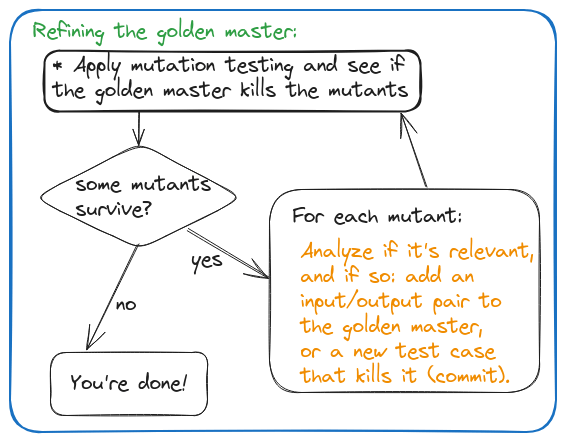
Once we have written the tests using golden master (or approval testing, which makes it easier to apply the Golden Master technique), we need to evaluate how well these tests protect the existing behavior against potential regressions.
To do this, we will use coverage and mutation testing tools[2], which can detect potential weaknesses in our tests and help us refine them until they protect the behavior against regressions satisfactorily (what “satisfactorily” means will depend both on the behavior and on the type of application in question).
The following figure summarizes this refinement process:
Therefore, it is highly recommended to use approval testing and mutation testing tools together.
In the case discussed in this post, we needed to apply these techniques to characterize a codebase written in TypeScript.
We used ApprovalsJS to write our golden master tests. For mutation testing in TypeScript, the tool we like to use the most is StrykerJS. In this post, we will see how to configure these two tools so that they work efficiently together within WebStorm.
The problem.
As we explained before, in an approval test, whenever there is a difference between the approved (expected) result and the result obtained during the test, ApprovalsJS launches a visual comparison tool so that the developer can more easily evaluate the discrepancy between the two results[3].
However, this becomes a problem when we use mutation testing, a technique based on deliberately introducing mutations (basically regressions) into the source code to check whether the tests fail as expected.
A mutation testing tool will generate a large number of copies of the code, introducing a mutation into each copy (the mutant), and then run our tests against each of those copies.
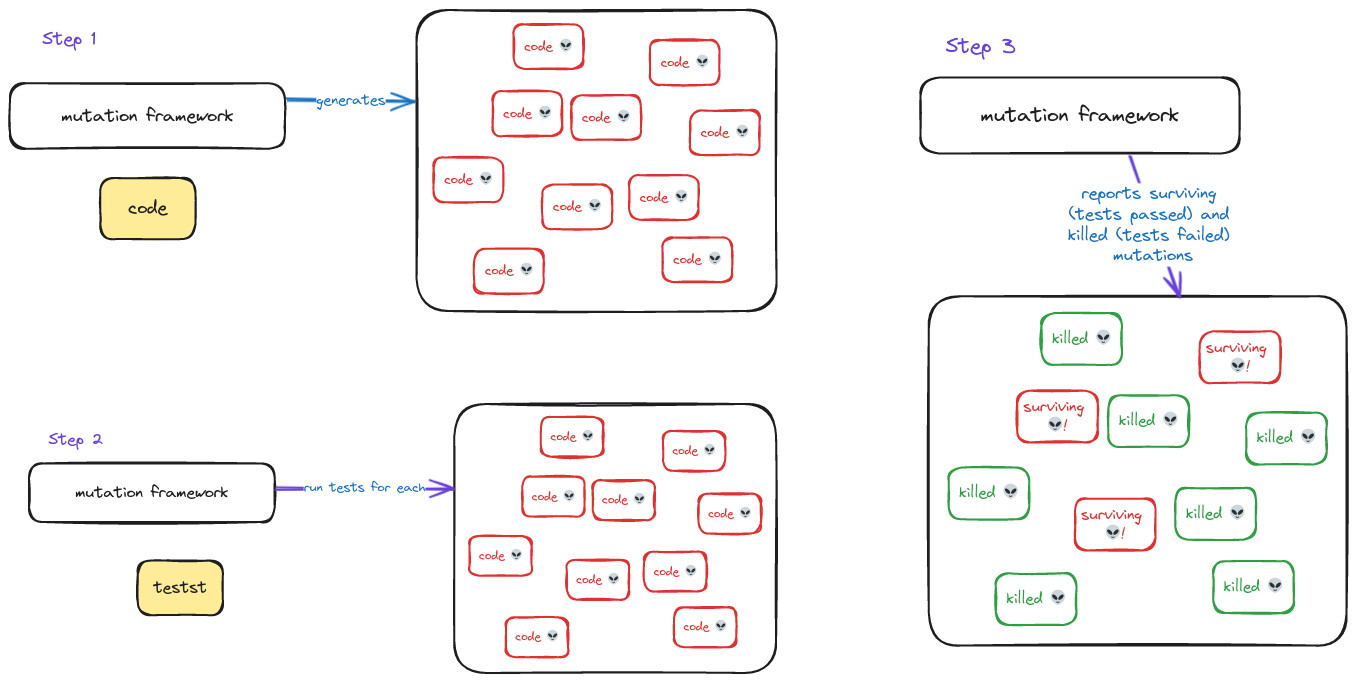
If the tests fail when run against a mutant, it means that they protect us against that type of regression. If they do not fail, we may have discovered a weakness in our tests[4].
When we use a mutation testing tool, assuming our tests are not terrible to begin with, they should fail for most mutants.
The problem is that if the failing test happens to be an approval test, it will launch whatever diff tool we have configured, and execution will stop until we interact with that tool.
Therefore, the approval testing workflow of launching a diff tool whenever a test fails is incompatible with mutation testing and becomes an obstacle.
It is worth mentioning that this potential problem is already solved out of the box when we use approval testing together with mutation testing in Java and .NET, but unfortunately this is not the case when we use ApprovalsJS and StrykerJS with WebStorm.
When running a mutation testing tool, we need to prevent the diff tool from being launched every time an approval test fails so that the process can run without human intervention.
Our solution.
To resolve this incompatibility between mutation testing and approval testing, we need to somehow inform the Reporter about the context in which the tests are being executed, in other words, whether or not we are using mutation testing.
Looking at the ApprovalsJS source code, specifically the GenericDiffReporterBase class, which we extended to create our reporter for WebStorm, WebStormReporter, we can see that it has a public isReporterAvailable(): boolean method that is used as a guard clause in the canReportOn(fileName: string): boolean method of the Reporter interface[5]. If isReporterAvailable returns false, canReportOn will also return false, preventing the WebStorm diff tool window from opening.
Knowing this, we override the isReporterAvailable(): boolean method in WebStormReporter:
For this to work as intended, all that remains is to set the Node environment variable MUTATION_TESTING to true whenever we run StrykerJS. This can be achieved using the "command" property of the "commandRunner" object in the stryker.conf.json file, which configures StrykerJS, as follows:
With this modification to the StrykerJS configuration and the change to WebStormReporter shown above, the diff tool will never be launched while mutation tests are running.
The MUTATION_TESTING environment variable will only exist for the duration of the mutation test execution. This means that if, at any point, we run tests that are not mutation tests, we recover the behavior of launching the configured diff tool whenever an approval test fails.
Conclusion.
While using mutation testing with StrykerJS in WebStorm to refine some golden master tests that used ApprovalsJS, we were surprised to find that the diff tool was launched every time the tests failed. Since this happened for almost every mutant generated, running the mutation tests effectively ceased to be an automated process.
To solve this, we had to look at the ApprovalsJS source code to determine how to modify our Reporter implementation for WebStorm, and modify the StrykerJS configuration to introduce a Node environment variable that would inform our Reporter that the approval tests were being executed in the context of a mutation test run.
We hope this solution will help you avoid running into the same problem we did.
Acknowledgements.
We would like to thank the companies that have trusted us so far to help their teams improve the way they work with their legacy code. We have already delivered four editions of our Changing Legacy training, which have received very good feedback and have allowed us to refine its content.
Finally, we would also like to thank Erik Mclean for the photo used in this post.
Notes.
[1] There are different sampling strategies for generating our golden master (input and output). The main sampling strategies are:
a. Faking input & recording output.
b. Generating random input & recording output.
c. Recording production input & output.
We explore this process in greater depth in our Changing Legacy training.
[2] On our blog, you can find other interesting posts about mutation testing.
[3] In Integrating ApprovalsJS with WebStorm, we explain how we configured ApprovalJS to use WebStorm’s diff tool.
[4] This is not always the case. Some surviving mutants (those for which our tests do not fail) are not relevant for improving the tests, but may instead be caused by either dead code or unnecessary code. To explore this idea in more depth, read our post Relevant Mutants.
[5] See the code for isReporterAvailable and canReportOn in the GenericDiffReporterBase class, and the Reporter interface.