

Integrating Approvals JS with WebStorm
Published by Fran Reyes & Manuel Rivero on 19/05/2026
This post is an English translation of the original post: Integrando ApprovalsJS con WebStorm.
Context.
In our training Changing Legacy Code we explore different ways of characterizing legacy code. One of the techniques we explain is approval testing.
Approval testing facilitates the application of the Golden Master technique, providing a tool that helps us with some of the most difficult and/or cumbersome steps of the Golden Master technique:
- comparing the actual result with the approved one (golden master),
- visualizing the differences between them (if any), and
- the process of approving a new valid result (updating the golden master).
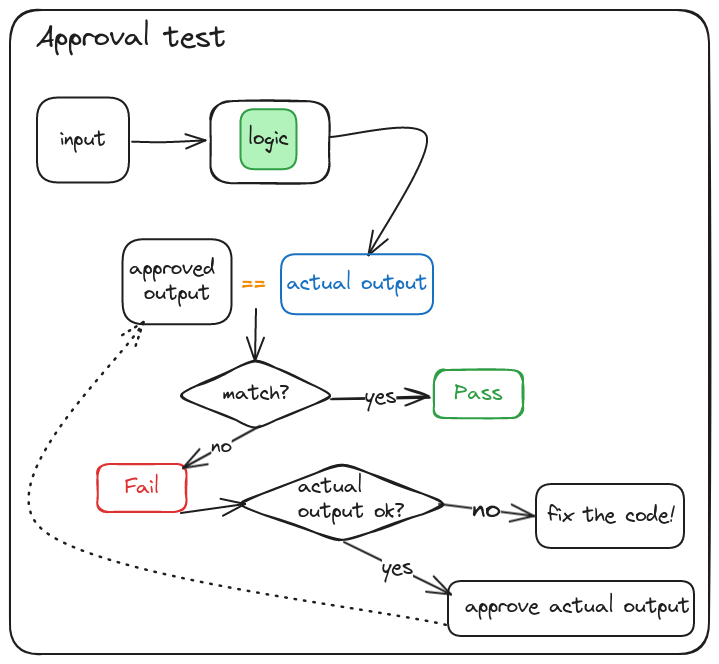
In a recent edition of the training that used Typescript as the main language, we used the Approvals JS library to demonstrate how to apply approval testing[1].
Approvals JS is the Node version of the Approvals tool, which is available in several languages, with the Java version probably being the most popular and best maintained.
The problem, or rather, our needs.
Although Visual Studio Code can also be used during the training, the IDE we use for our demos is WebStorm because it is the one we usually use for development.
When there is a difference between the actual result and the approved result, Approvals JS launches a diff tool to make it easier to detect the differences between both results, thus helping us determine the origin of those differences.
Approvals defines an abstraction for this responsibility of comparing the actual and approved results: the Report[2]. This abstraction is implemented through concrete adapters that use different diff tools.
Approvals JS comes configured with a list of Reports that it uses in priority order. In other words, it first tries to execute the first Report in the list; if it finds it and everything works correctly, it uses that one, otherwise it moves on to try the next one in the list, and so on.
In our case, we were not interested in using (we did not even have them installed) any of the diff tools configured by default (BeyondCompare, Diffmerge, P4merge, Tortoisemerge, etc.). Instead, we wanted to use WebStorm’s own diff tool so we would not have to switch contexts and could have a smoother development experience[3].
The problem was that there was no default Report for working with WebStorm.
The solution: writing a Report for WebStorm.
To meet our need of using WebStorm’s own diff tool and having a smoother development experience, we had no choice but to write an adapter for the Report abstraction that uses WebStorm’s diff tool.
This is the code for our WebStormReporter:
Approvals JS can currently be integrated with two runners, Jest and Mocha. We limited ourselves to making our WebStormReporter work with Jest because it is the runner we use in the training. If you need to use WebStorm with Mocha, check the documentation to see how to modify it.
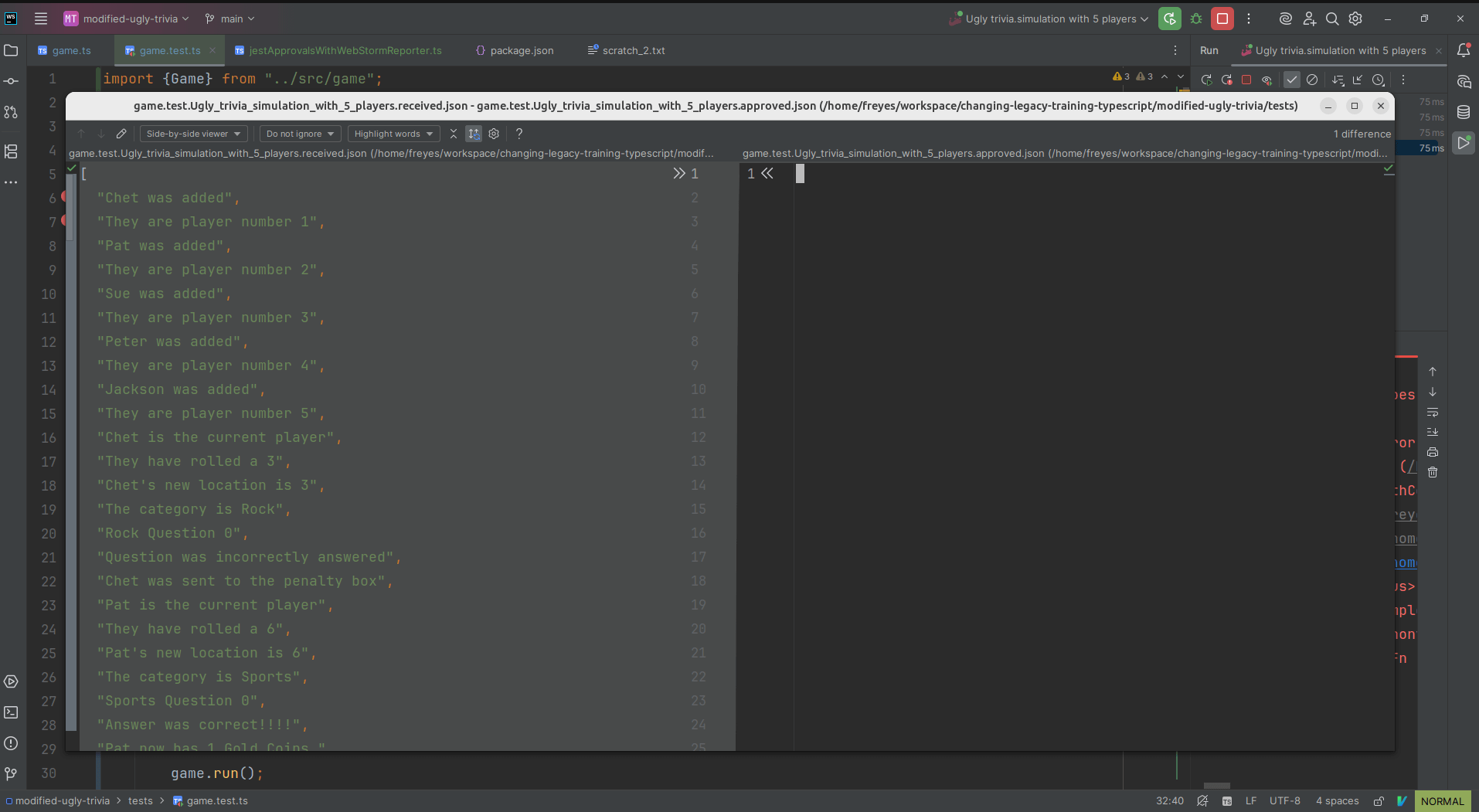
To use WebStormReporter, you only need to call the verifyAsJson function[4] that we export in the tests instead of the function provided by Jest.
Conclusion.
We have shown how, thanks to the Report abstraction in Approvals, it is possible to integrate Approvals JS with WebStorm in a simple way.
In a future post, we will talk about what we had to do to combine approval testing and mutation testing in an integrated way within WebStorm.
Acknowledgements.
We would like to thank the three companies that have trusted us so far to help their teams improve how they work with their legacy code. We have already delivered four editions of the Changing Legacy Code training, which have received very positive feedback and allowed us to refine its content.
Finally, we would also like to thank Markus Spiske for the photo used in the post.
Notes.
[1] We used version 7.2.3. To prevent compilation from failing, you need to add the ìnclude option to tsconfig.json, indicating that it should only check types in files inside src, because there are several files in Approvals JS that do not pass type checking.
[2] Approvals defines a whole series of core abstractions (Writer, Reporter, Namer..) that allow its behavior to be extended and adapted if necessary.
[3] We are also used to it because we regularly use it to resolve merge conflicts or visualize changes in the Local History.
[4] JestApprovals has other methods such as verify and verifyAll. We use verifyAsJson because we needed to compare objects and found it more convenient to do so using the JSON format. This is why we only focused on providing a version of verifyAsJson that uses our WebStormReporter.